* 유저의 위치 정보 받는 방법
navigator.geolocation.getCurrentPosition(onGeoOk, onGeoError);
성공했을 때 onGeoOk, 실패했을 때 onGeoError 함수를 실행
| 1. 위치 정보를 통해 위도와 경도 정보를 받는다. |
| 2. weather API에서 위도와 경도 정보를 넣어 지역+날씨를 확인한다. https://openweathermap.org/ ㄴ 회원가입 후 API_KEY를 받아야한다! |
| 3. js에서 API를 불러와야한다. |
const API_KEY = "67f03e334725f705ab02488ce66beb31"
function onGeoOk(position) {
const lat = position.coords.latitude;
const lon = position.coords.longitude;
const url = `https://api.openweathermap.org/data/2.5/weather?lat=${lat}&lon=${lon}&appid=${API_KEY}&units=metric`
fetch(url).then(response => response.json()).then(data => {
const weather = document.querySelector("#weather span:first-child");
const city = document.querySelector("#weather span:last-child");
city.innerText = data.name;
weather.innerText = `${data.weather[0].main} / ${data.main.temp}`;
});
}
function onGeoError() {
alert("Can't find you. No weather for you.");
}
navigator.geolocation.getCurrentPosition(onGeoOk, onGeoError);
| fetch(url).then(response => response.json()).then(data => { const weather = document.querySelector("#weather span:first-child"); const city = document.querySelector("#weather span:last-child"); city.innerText = data.name; weather.innerText = `${data.weather[0].main} / ${data.main.temp}`; }); |
fetch(url) - javascript 가 url의 정보 서버에서 가져올 수 있게 해준다.
ㄴ fetch(url).then(response => response.json()).then(data => { });
url정보는 검사 -> 네트워크에서 확인 가능
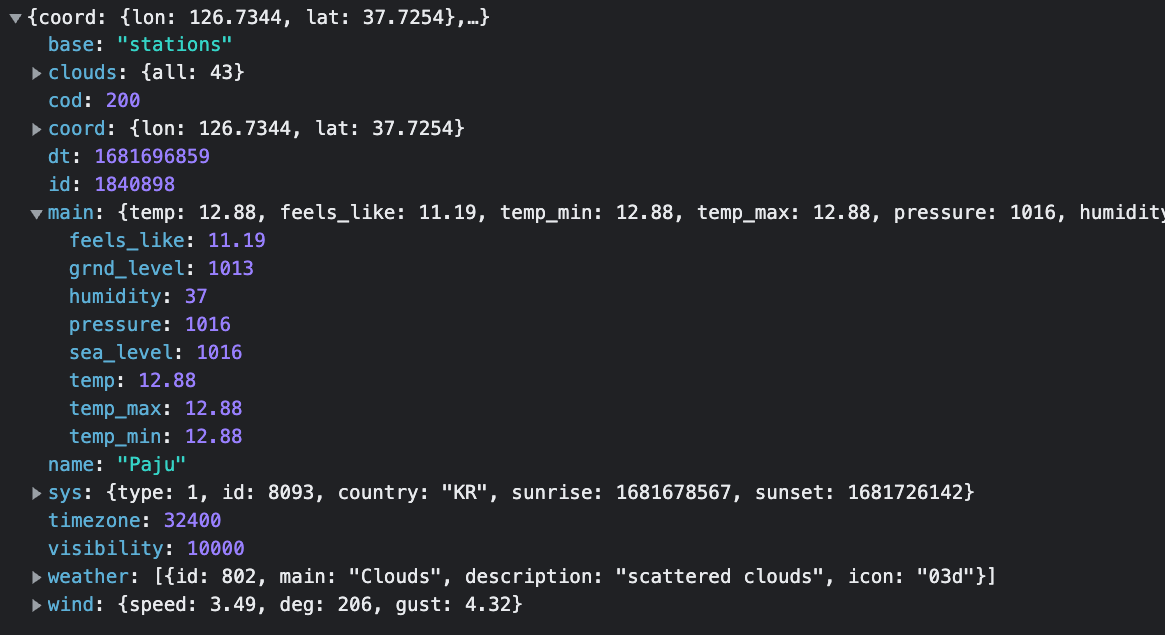
URL에 있는 정보들 - json()
data.name = "paju" 형식으로 불러올 수 있다.
반응형
'프론트엔드 > javascript' 카테고리의 다른 글
| javascript (16) - 캔버스 만들기 #2 (canvas API) (0) | 2023.05.02 |
|---|---|
| javascript (16) - 캔버스 만들기 #1 (canvas API) (0) | 2023.05.02 |
| javascript (12) - ToDoList #3 (0) | 2023.04.13 |
| javascript (12) - ToDoList #2 (0) | 2023.04.13 |
| javascript (12) - TodoList #1 (0) | 2023.04.12 |


