    function Btn({ text, onClick }) {
        return(
        <div>
            <button
                onClick={onClick}
                style={{
                    backgroundColor: "tomato",
                    color: "white",
                    padding: "10px 20px",
                    border: 0,
                    borderRadius: 10,

                }}> {text} </button>
        </div> )
    }

    function App() {
        const [value, setValue] = React.useState("Save Changes")
        const changeValue = () => setValue("Revert Change")
        return (
            <div>
                <Btn text={value} onClick={changeValue} />
                <Btn text="Continue" />
            </div>
        )
    }

    const root = document.querySelector("#root");
    ReactDOM.render(<App />, root);
* props 는 스트링, flooen, 함수 보낼 수 있어 좋다.
<Btn text={value} onClick={changeValue} />
여기서 onClick은 커스텀 컴포넌트에 들어있어 이벤트리스너가 아닌 prop이다.
<button onClick={}> 이렇게 html요소에 들어가면 이벤트리스너이다.
커스텀 컴포넌트에 들어간 요소들은 자동적으로 return에 포함되지 않기 때문에
직접 function에 전달해줘야한다. function Btn({text, onClick})
* prpos의 memo 기능
const MemorizedBtn = React.memo(Btn)
function App() {
const [value, setValue] = React.useState("Save Changes")
const changeValue = () => setValue("Revert Change")
return (
<div>
<MemorizedBtn text={value} onClick={changeValue} />
<MemorizedBtn text="Continue" />
</div>
)
}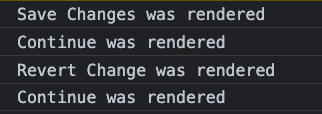 <기존 코드 결과> 데이터가 수정되면 전체적으로 re-render가 되기 때문에 변경없는 continue가 다시 한번 render됨 |
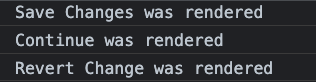 <React. memo 코드결과> 데이터 수정이 없으면 re-render를 하지 않음 |
const MemorizedBtn = React.memo(Btn)
<MemorizedBtn text={value} onClick={changeValue} /> //state로 인한 valuer값 변경으로 re-render
<MemorizedBtn text="Continue" /> // 값 변경이 없으므로 re-render하지 않음
props 변경되지 않는 컴포넌트를 re-render하지 않을 수 있다. React.memo.
1000개의 컴포넌트가 있을 때 모든 컴포넌트가 re-render되면 어플리케이션 실행이 느려질 수 있다.
memo기능을 사용해서 바뀌는 부분만 re-render할 수 있다.
*props Type 설정
props을 넣지 않거나 중요한 prop이거나 잘못된 타입의 내용을 넣는 것을 방지하기 위해 검사하는 기능을 넣을 수 있다.
text에는 반드시 string이 들어가야한다고 지정하는 것!
function App() {
        const [value, setValue] = React.useState("Save Changes")
        const changeValue = () => setValue("Revert Change")
        return (
            <div>
                <Btn text="save Change" fontSize={18} />
                <Btn text={14} fontSize={"continue"} />
            </div>
        )
    }
<Btn text="save Change" fontSize={18} />
<Btn text={14} fontSize={"continue"} />
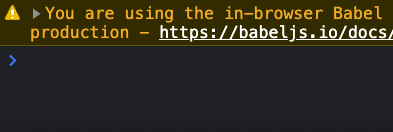
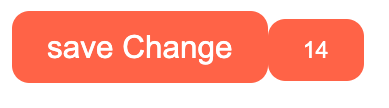
실수로 text와 fontSize에 잘못된 값이 들어가도 syntax에서는 에러라고 판단하지 않고 그대로 전달한다. 그래서 text에는 string fontSize에는 number가 들어가야 된다고 정의해줘야한다.
 |
 |
   Btn.propTypes = {
        text: PropTypes.string.isRequired,
        fontSize: PropTypes.number,
    }
    function App() {
        const [value, setValue] = React.useState("Save Changes")
        const changeValue = () => setValue("Revert Change")
        return (
            <div>
                <Btn text="save Change" fontSize={18} />
                <Btn text={"continue"} />
            </div>
        )
    }
 |
propType으로 text는 스트링, 필수 fontSize는 숫자 선택사항으로 설정해 두었다.
function Btn( { text, fontSize = 12} ) {}
// 설정된 fontSize 값이 없을 경우 12을 기본값으로 한다.
반응형
'프론트엔드 > react' 카테고리의 다른 글
| React (8) - Effects #1 (0) | 2023.04.24 |
|---|---|
| React (7) - Create React App Install for mac (0) | 2023.04.24 |
| React (6) - Props (0) | 2023.04.20 |
| React (5) - MinutesToHours, KmToMiles Converter (0) | 2023.04.20 |
| React (5) - Converter, 삼항연산자 (0) | 2023.04.19 |


