1. api 불러오기
2. 로딩중일때 "Loading..." 로딩후 <select>
3. <input>으로 달러 값 받음, 계산 후 표시
ㄴ 코인 화폐 단위 불러오기
ㄴ 코인 화폐 usd 값 불러와서 계산하기
4. 리셋버튼
5. 플립(전환하기)버튼
* 불러온 api 데이터 추출하기
fetch("https://api.coinpaprika.com/v1/tickers") .then((response) => response.json()) //response를 받아서 response.json을 전달해준다. .then((json) => { setCoins(json); //json을 console.log 출력 setLoading(false); //로딩이 끝난후 '로딩이 아니다' 입력 setSymbol(json[0].symbol); setPrice(json[0].quotes.USD.price); })
첫 화면, 비트코인이 선택됐을 때도 계산하려고
setSymbol(json[0].symbol);
setPrice(json[0].quotes.USD.price);
import { useEffect, useState } from "react";

function App() {
  const [loading, setLoading] = useState(true);
  const [coins, setCoins] = useState([]);
  const [money, setMoney] = useState(0);
  const [price, setPrice] = useState(1);
  const [symbol, setSymbol] = useState("");
  const [flip, setFlip] = useState(false);

  useEffect(() => {
    fetch("https://api.coinpaprika.com/v1/tickers")
      .then((response) => response.json())     //response를 받아서 response.json을 전달해준다.
      .then((json) => {
        setCoins(json);                        //json을 console.log 출력
        setLoading(false);                     //로딩이 끝난후 '로딩이 아니다' 입력
        setSymbol(json[0].symbol);
        setPrice(json[0].quotes.USD.price);
      })
  }, [])

  const userMoney = (event) => {
    setMoney(event.target.value);
  }
  const chooseCoin = (event) => {
    const index = event.target.selectedIndex;
    const coin = coins[index];
    setSymbol(coin.symbol);
    setPrice(coin.quotes.USD.price);

  }
  const reset = () => setMoney(0);
  const flipped = () => {
    reset();
    setFlip((current) => !current);
  }
  return (
    <div>
      <h1>The Coins! {loading ? "" : `(${coins.length})`}</h1>
      {loading ? <strong>Loading...</strong> :
        <div>
          <select onChange={chooseCoin} >
            {coins.map((coin) =>
              <option key={coin.id}>
                {coin.name} ({coin.symbol}): ({coin.quotes.USD.price}) USD
              </option>
            )}
          </select>
          <hr />
          <input
            onChange={userMoney}
            value={flip ? money * price : money}
            id="usd"
            type="number"
            placeholder="usd"
            disabled={flip}>
          </input> USD

          <p> </p>

          <input
            onChange={userMoney}
            value={flip ? money : money / price}
            id="coin"
            type="number"
            placeholder="coin"
            disabled={!flip}>
          </input> {symbol}
        </div>
      }

      <p></p>

      <button onClick={reset}> reset </button>
      <button onClick={flipped}> flip </button>

    </div>
  );
}
export default App;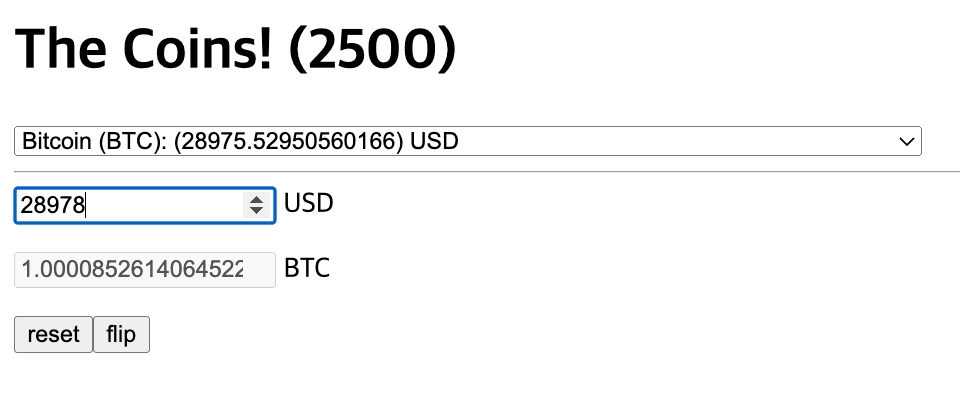
반응형
'프론트엔드 > react' 카테고리의 다른 글
| React (11) - API #2 컴포넌트 활용하기 (0) | 2023.04.28 |
|---|---|
| React (11) - API #1 await (0) | 2023.04.27 |
| React(9) - ToDoList 만들기 (0) | 2023.04.25 |
| React (8) - Effects #2 [cleanup] (0) | 2023.04.24 |
| React (8) - Effects #1 (0) | 2023.04.24 |


